Virtual Tours for Home Appliance Dealers: Showing Your Display Line
How do you shoot the built-in appliance corner and the display line, and how do you keep tours consistent across a dealer chain? A guide drawn from 90 dealer shoots.

Use the buttons below to get an AI summary of this article.
Virtual Tours for Home Appliance Dealers: Showing Your Display Line
Home appliances are compared online but bought in store. Customers pick a model online, then look for a dealer where they can see it.
What a virtual tour does for a dealer
Home appliances are a product group where prices are compared online but the purchase happens in store. Customers pick a model online, then look for "a place where I can see it." What they are searching for is not the product but which dealer physically has it on display.
That is why the question a virtual tour answers for dealers is very clear: does this store really have a showroom display, or do they sell from a catalog?
For small dealers, this distinction is critical. A thirty-square-meter shop and a three-hundred-square-meter showroom look the same on Google; both are an "authorized retailer." A virtual tour reveals the difference in one click and works in favor of the dealer with the bigger display.
The built-in appliance corner: the most closely examined section
What we see in the field: in dealer tours, visitors spend the most time in the built-in appliance and kitchen setup section.
The reason is clear. Built-in appliances are not just a product group; they are an installation decision. Customers want to see how the oven sits with the range hood, how the cooktop fits into the countertop, and whether the panel colors match. That is impossible to tell from a product photo.
What we pay attention to during the shoot:
- The entire kitchen setup should be visible in a single scene; shooting it in pieces does not work here
- All cabinet doors in the setup should be closed and the countertop clear
- The displays of built-in appliances are kept off; lit screens cause glare in a 360° image
- Price and model tags for the setup are placed neatly, since this is the first information the customer sees
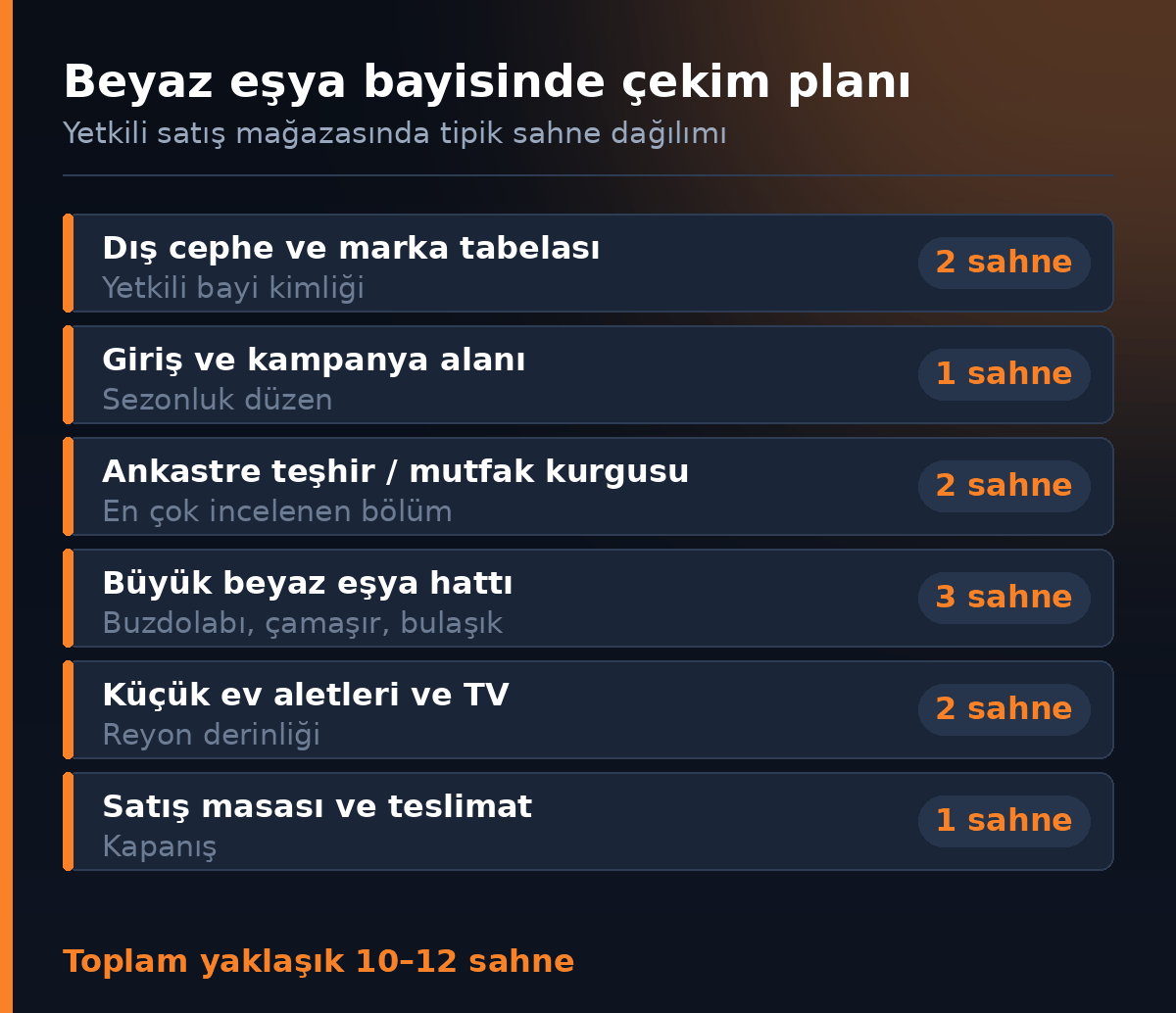
How many scenes do you need?
A scene is a single 360° image captured from one tripod position in the space. For a dealer, the number of scenes depends on the number of product groups and how the display area is divided.
In an authorized retail store, the typical layout is as shown above: 10–12 scenes. A small dealer with a single sales floor can be done in 6–8 scenes. In large dealers that sell home appliances, electronics, and furniture together, the number of scenes can go beyond 18.
We explain how pricing is built on the number of scenes in a separate guide.
Reflections and tag layout along the display line
Along with furniture showrooms and automotive, home appliances are one of the industries where reflections are a challenge. Refrigerator doors, washing machines with glass doors, and stainless steel surfaces reflect the equipment.
The method that works is to set up the tripod at an angle at the end of the line, not directly facing the product line. This moves the reflection from the center of the product surface to the edge. On top of that, all ceiling lights are kept on; a line lit by spotlights produces glare spots in a 360° image.
Tag layout is a separate issue. In a 360° image, a crooked or fallen price tag is far more visible than in a photo. Before the shoot, all the tags along the line should be straightened.
Consistency across dealer chains
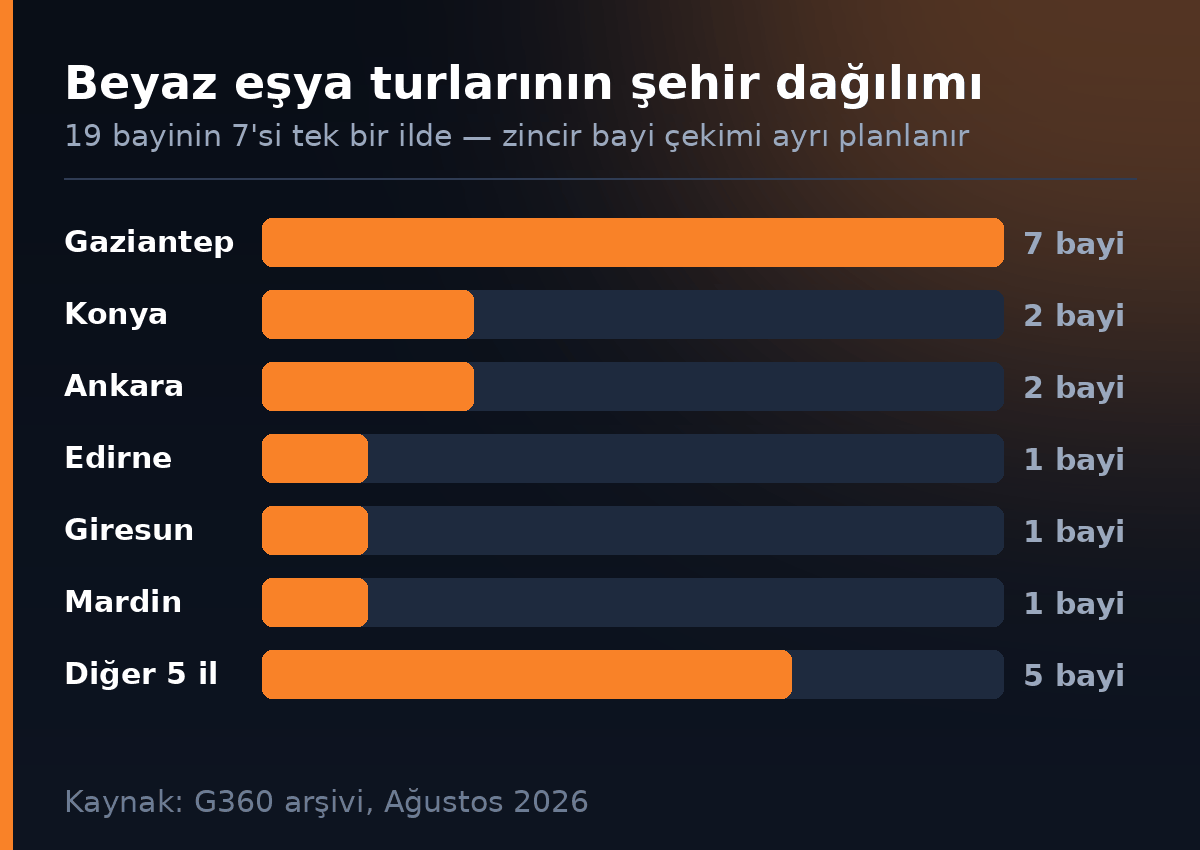
Because authorized dealerships are common in home appliances, the same brand can have many locations in the same region. 26 of the 90 dealers in our archive are in a single province, the most typical example of a dealer chain shoot.
In this setup, the key point is this: there should be no quality difference between locations. If one location has 12 bright scenes and another has 5 dark ones, customers comparing them will rule out the second, even though the store may not actually be bad.
The method that works in practice:
- Set a shared scene template for all locations (exterior 2, entrance 1, built-in 2, large appliance line 3, small appliances 2, sales 1)
- Shoot on dates close together if possible, so there are no seasonal display differences
- Connect each location separately to its own Google Business Profile
It is also important to make sure the brand name is written the same way at every location; inconsistent profile names create confusion in search.
From our archive: 90 home appliance dealers
The G360 archive holds virtual tours of 90 home appliance dealers. These dealers are spread across 24 provinces and 44 districts, but the distribution is not balanced: 26 of them are in a single province (Gaziantep), followed by Istanbul and Diyarbakır with seven dealers each.
The average Google rating of these dealers is 4.28, the same as the archive-wide level. The median review count is 56, with 17,232 reviews in total. In other words, home appliances are not a low-review industry like clothing or furniture; a likely reason is that the product is an expensive purchase that comes with an ongoing service relationship.
The full industry and city breakdown of the archive is in our Turkey data report, and completed projects are in our home appliance portfolio.
Preparing for shoot day
- Wipe the surfaces of all displayed products; fingerprints on stainless steel and glass are very noticeable in a 360° image
- Remove boxes, pallets, and packaging left in the aisles
- Straighten price tags and put back any that have fallen
- Keep the storage room door closed or leave the storage area out of the shoot
- Clear the paperwork and files from the sales desk
- Turn on all the showroom lighting, including the display spotlights
Connecting the tour to sales
For dealers, the most effective use is sending the tour link to customers who call to ask about prices. When the line "This product is on display in our store" goes out in the same message as the tour link, more people come to the store.
Beyond that, you can embed the tour on your website and make it accessible from your Google Business Profile. You can calculate how many scenes your dealership needs with the tool on our pricing page.
Frequently Asked Questions
An authorized retail store needs 10–12 scenes. A small dealer with a single sales floor can be done in 6–8 scenes. In large dealers that sell home appliances, electronics, and furniture together, the number of scenes can go beyond 18.
It is shot so the entire kitchen setup is visible in a single scene; shooting it in pieces does not work in this section. Cabinet doors are closed, the countertop is clear, and product displays are turned off. Price and model tags are placed neatly.
The tripod is set at an angle at the end of the product line rather than directly facing it, so the reflection moves from the center of the product surface to the edge. All ceiling lights are also kept on, because a line lit by spotlights produces glare spots.
Yes. Because each location has its own Google Business Profile, tours are shot and connected separately. However, a shared scene template should be set for all locations; otherwise, differences in scope and quality appear between them.
Usually not. The storage room door is kept closed or the area is left out of the shoot. The goal of the tour is not to show stock but to prove that the display area really exists.
Wipe the surfaces of displayed products, remove boxes and pallets from the aisles, straighten price tags, clear paperwork from the sales desk, and turn on all lighting, including the display spotlights.
The 90 dealers in the G360 archive have an average Google rating of 4.28, the same as the archive-wide level. The median review count is 56. These values reflect the businesses' overall Google performance, not a result of the virtual tour.
The most effective method is sending the tour link to customers who call to ask about prices. You can also embed the tour on your website, make it accessible from your Google Business Profile, and share it in store with a QR code.
A Professional Virtual Tour for Your Business
Give your customers an unforgettable experience with a 360° virtual tour.
Get a Free Quote