Virtual Tour Resolution, File Size, and Hosting Explained
Is 8K enough, where does the tour live, and do you need to pay a yearly fee? A guide to the technical setup and long-term cost of a virtual tour.

Use the buttons below to get an AI summary of this article.
Virtual Tour Resolution, File Size, and Hosting Explained
Resolution and hosting are the two technical topics people confuse most when it comes to virtual tours. Both have a direct effect on price, yet they are often missing from quotes.
In this guide, we explain both in plain terms: how many pixels your tour should have, how much space it takes up, where it lives, and whether you need to pay for it every year.
What resolution means
A 360° scene is stored in a single file called an equirectangular panorama. This file has a 2:1 ratio: its width is twice its height.
Resolution works differently here than in a regular photo. In a photo, all the pixels go into the frame you see. In a 360° scene, the pixels are spread across the entire sphere, and you only see a small part of it at any moment.
So an 8K panorama does not mean an 8K image on your screen. The number of pixels in your field of view is much smaller. That is why high resolution is not a luxury in 360° photography; it is a requirement.
Is 8K enough?
The short answer: yes, it is enough for standard use.
An 8192×4096 pixel panorama delivers roughly Full HD-level detail at a typical viewing angle. As long as the visitor does not zoom in, the image looks sharp.
There are cases where 8K is not enough:
- When visitors need to read a distant detail (a menu, a price tag, a technical panel)
- In very large spaces (factories, sports complexes, historic buildings)
- When viewing with a VR headset is the priority, since headsets need higher pixel density
Outside these cases, going above 8K increases file size without any visible benefit.
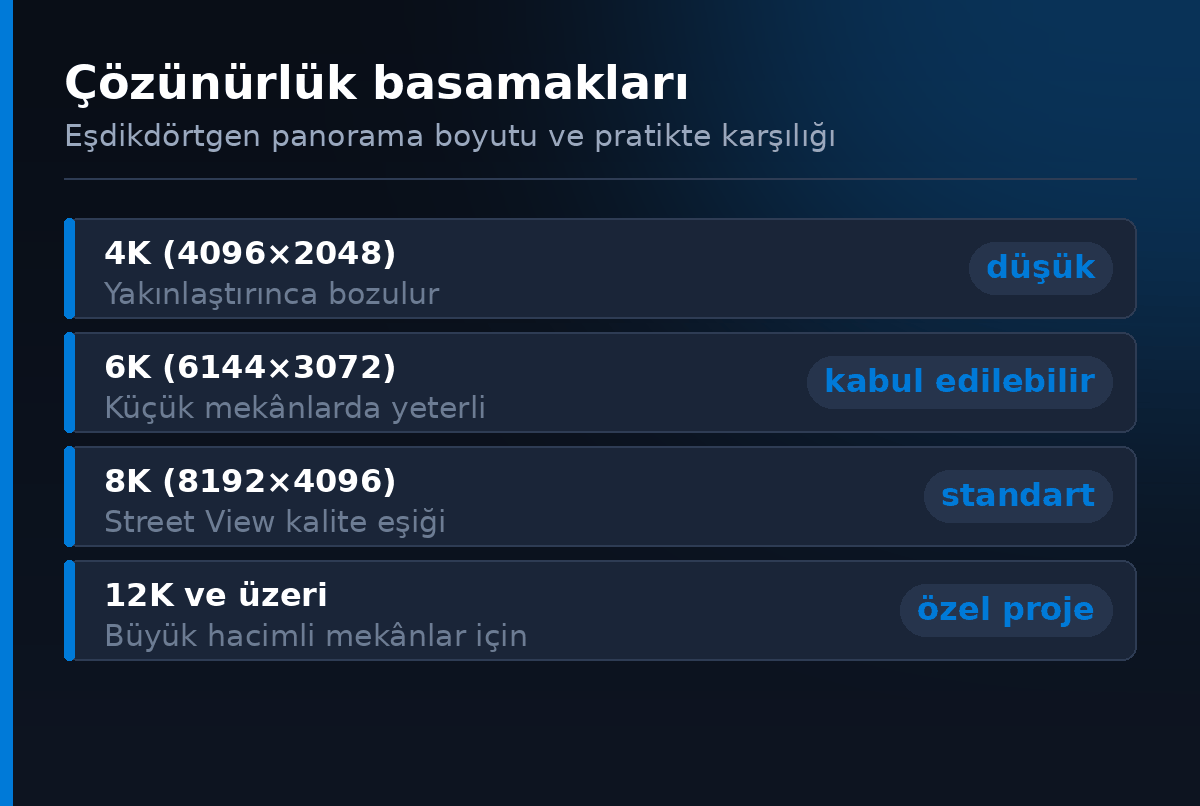
Resolution steps
The steps above are the typical values used in the industry.
The key point is this: resolution alone is not a sign of quality. A poorly stitched, badly exposed 12K panorama looks worse than a cleanly processed 8K one. Resolution is a necessary but not sufficient part of quality.
When comparing quotes, "we shoot in 12K" does not mean an advantage on its own. What really matters is the quality of stitching and image processing.
File size and loading time
An 8K panorama takes up roughly 3–8 MB, depending on the compression level. A twenty-scene tour comes to roughly 60–160 MB.
This size is not a problem, because the tour is not downloaded in one piece. Modern tour players split the image into tiles: only the high-resolution part of the area you are looking at gets loaded. That is why tours open smoothly on mobile connections too.
Still, there are two practical points:
- The first scene matters. The opening scene is the one that must load fastest; this is where the visitor waits.
- The number of scenes does not increase loading time, because scenes load as you move through the tour. So a 30-scene tour does not open more slowly than a 10-scene one.
Where the tour is hosted
There are two different setups here, and the difference directly determines cost.
On Google Street View. The tour is uploaded to Google's infrastructure, connected to the business listing on Google Maps, and becomes visible through the "See inside" feature. The files sit on Google's servers. We explain how the Google Maps integration works in a separate guide.
On a custom tour platform. If advanced features such as custom scene transitions, a side menu, presentation mode, or scene-by-scene audio are needed, the tour is hosted on a separate platform. In this case, the files sit on a server or in cloud storage.
The two are not alternatives to each other; in most projects, Google integration is the base, and a custom platform is added when needed.
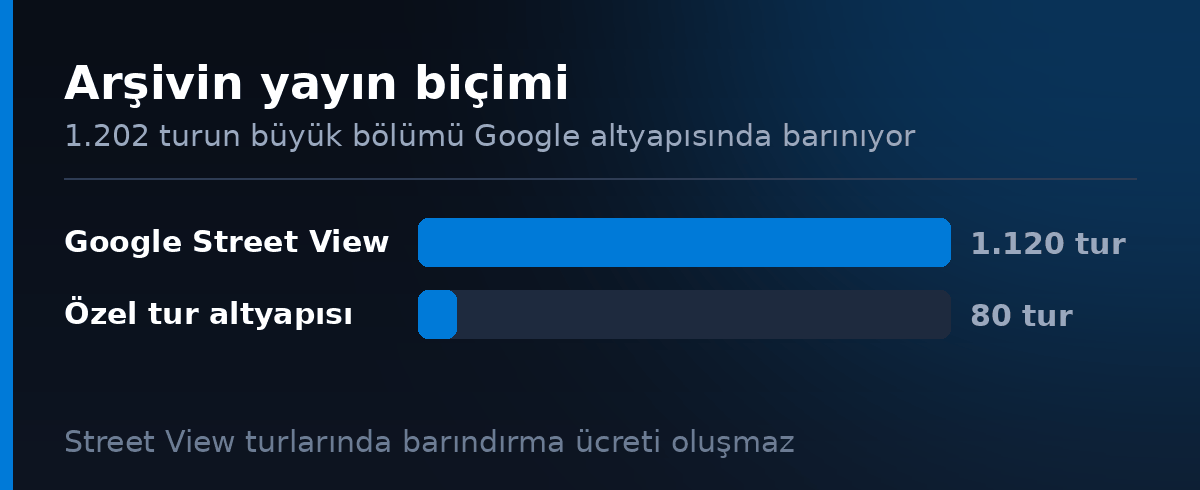
From our archive: how tours are published
Almost every tour in the G360 archive is published in two places at once: 1,530 tours appear on Google Street View, and 1,525 tours can also be explored on their own page on g360.ai. Only 13 shoots are on Street View alone, and only 8 are on our own platform alone.
The practical meaning of this breakdown: a standard business tour does not need separate hosting. Once the Google integration is done, the tour lives on Google's infrastructure, and the business has no hosting fee to pay.
You can explore the industry and city breakdown of the archive in our Turkey data report.
Should you pay a yearly fee?
This is one of the items to watch most closely when getting a quote.
Tours published on Google Maps are hosted on Google's infrastructure, so there should be no yearly hosting fee. A low starting price followed by a yearly fee later quietly pushes the total cost up.
The only case where a fee may be needed is tours hosted on a custom platform. There is a real server and bandwidth cost there, so a fee is reasonable. But it should be clearly stated at the start of the project.
The clear question to ask when getting a quote: "Is this a one-time payment, or is there a recurring fee?" We list the other questions to ask in our pricing guide.
How long a tour lasts
A virtual tour is a long-lasting digital asset. As long as the space does not change, it stays in place for years and does not become technically outdated: the panorama file is a standard format, and the player side keeps getting updated.
The cases that call for a refresh are limited:
- A major renovation or concept change
- A change of address
- Significant expansion of the space or new sections added
Outside these, it is normal for a tour to still be valid five years later. This turns a virtual tour into a one-time investment rather than a recurring expense. We cover the ROI side in a separate article.
Summary
8K is the right resolution threshold for a standard business tour. Anything higher only makes sense for very large spaces or when VR is the priority.
On the hosting side, the key fact is this: tours published on Google Maps live on Google's infrastructure and do not require a yearly fee. If a recurring payment is requested, ask why.
And finally: the resolution number alone does not show quality. A well-stitched 8K panorama always looks better than a poorly processed 12K one.
Frequently Asked Questions
It is enough for standard business tours. An 8192×4096 pixel panorama delivers roughly Full HD-level detail at a typical viewing angle. Projects where distant text must be readable, very large spaces, or VR-first projects may need more.
The pixels are spread across the entire sphere, and you only see a small part of it at any moment. An 8K panorama does not mean an 8K image on screen; far fewer pixels fall within your field of view.
No. A poorly stitched, badly exposed 12K panorama looks worse than a cleanly processed 8K one. Resolution is a necessary but not sufficient part of quality.
An 8K scene is roughly 3–8 MB depending on compression; a twenty-scene tour comes to roughly 60–160 MB. Because the tour is not downloaded in one piece, this size is not a problem for the viewer.
No. The player splits the image into tiles and only loads the high-resolution part of the area being viewed. Since scenes load as you move through the tour, a 30-scene tour does not open more slowly than a 10-scene one.
There are two setups. Tours connected to Google Street View live on Google's infrastructure. If advanced features such as custom scene transitions, a side menu, or presentation mode are needed, the tour is hosted on a separate platform.
Tours published on Google Maps are hosted on Google's infrastructure, so there should be no yearly hosting fee. Only projects hosted on a custom platform have a real server cost, and this should be stated up front.
As long as the space does not change, it stays valid for years; a panorama is a standard format and does not become technically outdated. A refresh is only needed after a major renovation, a change of address, or new sections being added.
A Professional Virtual Tour for Your Business
Give your customers an unforgettable experience with a 360° virtual tour.
Get a Free Quote